Posts

SSIS : SSIS package is failing in SQL agent job with webserviceTaskException: Service Description cannot be null + Solution
Image
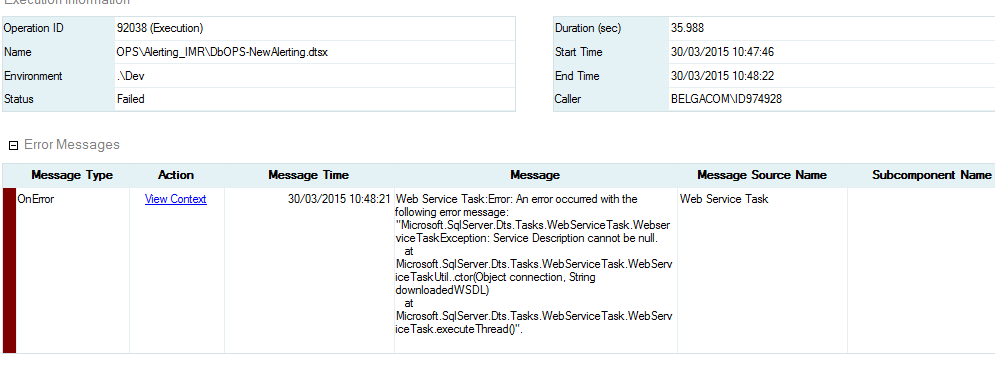
we are using webservice task in our ssis package and the package is successful in SSDT . when we created SQL job using that package it is failing with  webserviceTaskException: Service Description cannot be null. to solve the issue 1. we have given access to web service for ssis proxy account  2.we have given access on wsdl file folder  3.we given access to temp folder . Still no luck. So the solution for this . We need to give access to wsdl file also.  
SQL server 2012 TSQL : Msg 402, Level 16, State 1, Line 5 The data types datetime and time are incompatible in the add operator + Solution

Image
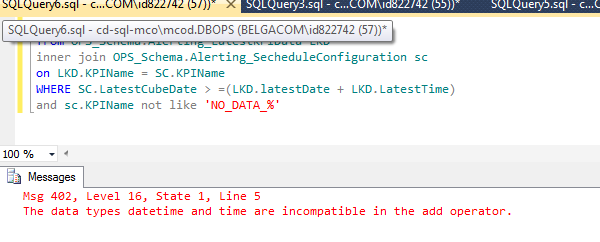
Recently when we are migrating sql server 2008 code into Sql server 2012 we found this error . Msg 402, Level 16, State 1, Line 5 The data types datetime and time are incompatible in the add operator.   we came to know that  we cannot  add (+)  or subtract (-)   datatime and time datatype columns as we do in SQL server 2008 . To perform the same functionality we need to cast the time column to datetime column and then perform your action. Delete LKD from OPS_Schema . Alerting_LatestKPIData LKD inner join OPS_Schema . Alerting_SecheduleConfiguration sc on LKD . KPIName = SC . KPIName WHERE SC . LatestCubeDate > =( LKD . latestDate + cast ( LKD . LatestTime as datetime )) and sc . KPIName not like 'NO_DATA_%'

SSAS :Comparing Tabular vs traditional multidimensional model in 2012

These are main features we need to consider when we are going for tabular model  against traditional multidimensional model . 1. Actions: Additional tab in Multidimensional Cube designer, which allows few triggers in cube development. Tabular model doesn’t have this feature. 2.Aggregations: Tab in Multidimensional Cube designer, which allows additional aggregations to the cube database. Tabular Model lags in this feature. 3.Custom Assemblies: We can add reference of custom assemblies in Multidimensional Cube but Tabular Model doesn’t have this flexibility. 4.Many to Many Relationships: We have direct option for adding many to many relationships in Dimensions and Facts for Multidimensional Cube design. This is one of the option but in Tabular Model we need to do some DAX manipulation for this implementation else no direct way. 5.Translations: Again a direct option in Multidimensional Cube designer but lack in Tabular Model designer solutions. 6.Data Mining : D...

SSAS Heterogenous Datasources : SQL Server ,Oracle ,Teradata Combinations

1.    How to use heterogeneous data sources in SSAS 1.1 Introduction              In our Microsoft BI projects we are creating many SQL Server analysis services CUBEs. In General all the Facts and Dimensions are present in one single SQL server instance which is most common design that everybody will fallow .In some cases we need to get the data from two different instances of SQL servers in this case one instance acts as primary data source and other instance acts as secondary data sources in Data Source view (DSV).   In our Telecom data warehouse we have different applications in different relational databases. Most of the mobile traffic data and Transactional data is available in Oracle and remaining Customer, CDR and Historical data in Teradata databases. We have to create near-real time CUBEs which we need to present /Alert data within 5-10 minutes of actual event occur for example if number of cal...

SSIS 2012: Error 21 System.ArgumentException: An item with the same key has already been added. at System.Collections.Generic.Dictionary`2.Insert(TKey key, TValue value, Boolean)

In SSIS 2012 when we have Project connection manger  and package connection manager with the same name then we will get this error . Error   21   System . ArgumentException : An item with the same key has already been added .      at System . ThrowHelper . ThrowArgumentException ( ExceptionResource resource )       at System . Collections . Generic . Dictionary ` 2. Insert ( TKey key , TValue value , Boolean add )      at Microsoft . SqlServer . Dts . Runtime . ReferenceId . ReferenceMap . Add ( String key , String value , Boolean isExternal )      at Microsoft . SqlServer . Dts . Runtime . ReferenceId . RefIdProducer . AddRefIdAttribute ( XmlElement element , String objectName , String objectId , ReferenceParserState state )       at Microsoft . SqlServer . Dts . Runtime . ReferenceId . RefIdProducer . GenerateRefId ( XmlElement element , ReferenceParserState state ) ...

SSAS : A connection cannot be made to redirector. Ensure that 'SQL Browser' service is running. (Microsoft.AnalysisServices.AdomdClient). + Solution

Problem : have installed Analysis service on my server machine through remote login from my service account. I am able to open Analysis services from there. When I open SSMS from the same service account on my local machine, I am not able to connect to that Analysis service. It is giving me error by saying : "A connection cannot be made to redirector. Ensure that 'SQL Browser' service is running. (Microsoft.AnalysisServices.AdomdClient). A connection attempt failed because the connected party did not properly respond after a period of time, or established connection failed because connection host has failed to respond 10.245.192.111:2382(System)." Solution : Based on my research, the issue was caused by the Browser Service account was changed to the domain account. In your scenario, you can try to connect to the Analysis Service using <Servername>:2383 instead of instance name. Or you can change the Browser Service account to "Local System"....

SSAS : 'Void Microsoft.AnalysisServices.Server.Connect(System.String, Boolean)'

Problem : We have a fresh install of WS 2012 and SQL Server 2012 Standard. When connecting to Analysis Services with Management Studio, we get the following error: TITLE: Microsoft SQL Server Management Studio ------------------------------ Error connecting to 'SERVERNAME'. ------------------------------ ADDITIONAL INFORMATION: Method not found: 'Void Microsoft.AnalysisServices.Server.Connect(System.String, Boolean)'. (ObjectExplorer) ------------------------------ BUTTONS: OK ------------------------------ Advanced Information shows: =================================== Error connecting to 'SERVERNAME'. =================================== Method not found: 'Void Microsoft.AnalysisServices.Server.Connect(System.String, Boolean)'. (ObjectExplorer) ------------------------------ Program Location:    at Microsoft.SqlServer.Management.UI.VSIntegration.ObjectExplorer.SupportedServers.IsIMBIServer(SqlOlapConnectionInfoBase connectionInfo)    at Microsof...