Posts

Showing posts with the label SSIS

SSIS : Error :ole has sent a request and is waiting for a reply in ssis + solution

when we are trying to load huge data using ssis we are getting this error ole has sent a request and is waiting for a reply in ssis. The solution we got is apply delay validation = true on the package level so that you can avoid the above error.

SSIS Error : Code: 0xC0047062 + Its solution

Hi All we need to get files from Https location and then extract and load . For this we are using Script transformation AS SOURCE . As the file need some string operations to get columns we used Script transformation in that we used Httpwebrequest  to connect to that URL by passing username and password . The package works fine from BIDS in my local machine but when we deployed in dev server and created SQL job  the job is getting failed at  HTTP url connection level . with the fallowing error Code: 0xC0047062     Source: get chat file list get files [1]     Description: System.Net.WebException: Unable to connect to the remote server ---> System.Net.Sockets.SocketException: No connection could be made because the target machine actively refused it Code: 0xC0047038     Source: get chat file list SSIS.Pipeline     Description: SSIS Error Code DTS_E_PRIMEOUTPUTFAILED. ...

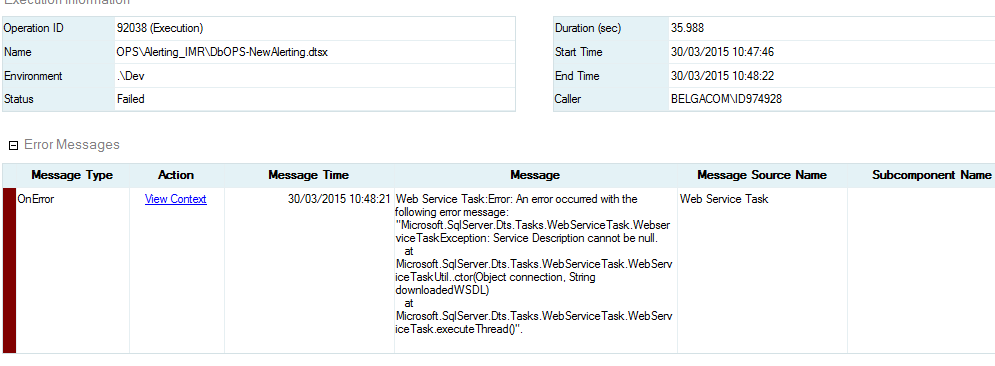
SSIS : SSIS package is failing in SQL agent job with webserviceTaskException: Service Description cannot be null + Solution

Image
we are using webservice task in our ssis package and the package is successful in SSDT . when we created SQL job using that package it is failing with  webserviceTaskException: Service Description cannot be null. to solve the issue 1. we have given access to web service for ssis proxy account  2.we have given access on wsdl file folder  3.we given access to temp folder . Still no luck. So the solution for this . We need to give access to wsdl file also.  

SSIS : The requested OLE DB provider SQLNCL10 is not registered. Error code: 0x00000000. An OLE DB record is available. Source: "Microsoft OLE DB Service Components" Hresult: 0x80040154 Description: "Class not registered".

when we deployed the ssis package which is developed in sql 2008 r2  the connection string of  Sql server OLEDB provider looks like Data Source=Sever\xxxx;Initial Catalog=DbOdsPMT;Provider=SQLNCLI10.1;Integrated Security=SSPI;Auto Translate=False;Packet Size=32000;Application Name=SSIS-Package-{866F41EB-2082-4344-B650-4BDDB0CFEC95}Sever\xxxx; But when we call the package in SQL agent the connection string changed  to Data Source=Sever\xxxx;Initial Catalog=DbOdsPMT;Provider= SQLNCLI11 ;Integrated Security=SSPI;Auto Translate=False;Packet Size=32000;Application Name=SSIS-Package-{866F41EB-2082-4344-B650-4BDDB0CFEC95}Sever\xxxx; Due to  this the sql Job is Failing  Source: DbOdsPMT-DRA Connection manager "DbOdsPMT"     Description: SSIS Error Code DTS_E_OLEDB_NOPROVIDER_ERROR.  The requested OLE DB provider SQLNCL10 is not registered. Error code: 0x00000000.  An OLE DB record is available.  Source: "Microsoft OLE ...

SSIS error 0xC0010026 :The task has failed to load. The contact information for this task is "%1"." + Solution

Problem : when we try to load a SSIS package from the server then we are facing the fallowing error . TITLE: Microsoft Visual Studio ------------------------------ Failed to save package file "C:\Documents and Settings\id826821a\My Documents\Visual Studio 2008\Projects\Integration Services Project1\Integration Services Project1\DbOdsPMT-DRA.dtsx" with error 0xC0010026 "The task has failed to load. The contact information for this task is "%1".". ------------------------------ ADDITIONAL INFORMATION: Failed to save package file "C:\Documents and Settings\id826821a\My Documents\Visual Studio 2008\Projects\Integration Services Project1\Integration Services Project1\DbOdsPMT-DRA.dtsx" with error 0xC0010026 "The task has failed to load. The contact information for this task is "%1".". ------------------------------ BUTTONS: OK ------------------------------ Solution : This issue will come...

SSIS Data Loading Into Excel + the number in this cell is formatted as text or preceded by an apostrophe ssis

When we try to load data into Excel we are getting the comment on each cell like the number in this cell is formatted as text or preceded by an apostrophe ssis to avoid these we did this work around 1. take a template with sample data 2.load new data(it takes same datat ypes as in sample data) 3.remove sample data from target excel Brief decription for the above Steps. 1. Take a Destination Excel format as a Template  with some sample data ( with the format we required ) 2. copy that template to destination location and load the other data into that Excel 3. Then remove the sample data from the excel  using script task .   Please see my previous post on how to delete 2nd row from the excel using script task

SSIS Script task to Delete The 2nd row in a Excell file

we want to Delete the 2nd row from the Excel file where 1st row Contains Headings . Here is the script task component code to delete 2nd row from the Excel . Major Steps : Create Excel.Application Object                      Open work of the Given Excel file                      Open sheet                      Delete the Entire row  of Cell A2   using Entirerow,Delete                      Save The workbook                      Quit the excel Dim filename As String Di...

SSIS Parameters : 'Microsoft.SqlServer.Dts.Runtime.DtsRuntimeException'

You will get the fallowing error  'Microsoft.SqlServer.Dts.Runtime.DtsRuntimeException'   when you use the SSIS parameters as read write . SSIS Parameters are always read only . It is not for write purpose . Please see my blog  Parameters Vs Variables for more info http://surendrathotamsbiproffesional.blogspot.be/2014/06/ssis-ssis-2012-new-feature-parameters.html

SSIS Error : Code: 0xC0047012 : A buffer failed while allocating 10484760 bytes + Solution

when ever we got the this error  Code: 0xC0047012 : A buffer failed while allocating 10484760 bytes  it is due to memory size full . All the transactions in SSIS is handled by buffers only The setting you need to be aware of is "Max Server Memory" and if there is physical memory available on the server then you can increase the memory size using the command below. I am linking to a post where it shows suggested Max memory settings but you shouldn't depend on it completely and use your judgement to find the right balance. SSIS packages use memory that is outside of the Max memory setting  and bump your memory reserved for OS as needed. Note that you increase the size of memory for the server and not for a database. http://sqlserverperformance.wordpress.com/2008/08/06/suggested-max-memory-settings-for-sql-server-20052008-2/ http://troubleshootingsql.com/2010/11/28/common-sql-server-myths-%E2%80%93-series-ii-%E2%80%93-sql-memory/ --Sample code only -- Turn on adva...

SSIS Error : Error: 0xC00F9304 at Package, Connection manager "Excel Connection Manager": SSIS Error Code DTS_E_OLEDB_EXCEL_NOT_SUPPORTED: The Excel Connection Manager is not supported in the 64-bit version + Solution

Problem : have a 64bit system and installed ssis on my system. How do I changed the ssis project to 32 bit. I have this error: Information: 0x4004300A at Data Flow Task, SSIS.Pipeline: Validation phase is beginning. Error: 0xC00F9304 at Package, Connection manager "Excel Connection Manager": SSIS Error Code DTS_E_OLEDB_EXCEL_NOT_SUPPORTED: The Excel Connection Manager is not supported in the 64-bit version of SSIS, as no OLE DB provider is available. Error: 0xC020801C at Data Flow Task, Excel Source [1]: SSIS Error Code DTS_E_CANNOTACQUIRECONNECTIONFROMCONNECTIONMANAGER. The AcquireConnection method call to the connection manager "Excel Connection Manager" failed with error code 0xC00F9304. There may be error messages posted before this with more information on why the AcquireConnection method call failed. Error: 0xC0047017 at Data Flow Task, SSIS.Pipeline: component "Excel Source" (1) failed validation and returned error code 0xC020801C. So...

SSIS Error : "Microsoft.SqlServer.Dts.Tasks.WebServiceTask.WebserviceTaskException: Could not read the Web Services Description Language (WSDL) file. The input WSDL file is not valid

Problem: I have a web service task that worked fine prior to upgrading from SQL Server 2005, but in 2012 fails with an error saying the "wsdl file is invalid".  I am using the same wsdl file as I was using in 2005.  Connectivity tests for the web service connection manager in 2012 worked fine. Any ideas on why I would be getting a failed wsdl file when it worked ok on the 2005 platform?  Below is the specific error: [Web Service Task] Error: An error occurred with the following error message: "Microsoft.SqlServer.Dts.Tasks.WebServiceTask.WebserviceTaskException: Could not read the Web Services Description Language (WSDL) file. The input WSDL file is not valid. The following error occurred while reading the file. There is an error in XML document (3, 2)..    at Microsoft.SqlServer.Dts.Tasks.WebServiceTask.WebServiceTaskUtil..ctor(Object connection, String downloadedWSDL)    at Microsoft.SqlServer.Dts.Tasks.WebServiceTask.WebServiceTask.executeThrea...

SSIS Error : Cannot move task with precedence constraint out of the container

Problem : I have a container with around 10 tasks in it and when I am trying to move the lowest task I am getting the error: "Cannot move task with precedence constraint out of the container" - although I am not moving it out of the container. It seems that the boundary of the container is not recognized correctly. How can it be solved - I need all these tasks to be inside one container - as there are variables with its scope. Solution : I get this error as soon as I try to resize the task inside the container. Try moving the task control with the cursor keys Up-down-Left-Right, while holding down the CTRL key. I have experienced unexpected behaviour whenever I tried to drag with the mouse. And trying to change the size of the sequence container or the tasks is an exercise in self-control. If you right-click on the task control (or any other control) there is an Autosize command that helps a little.

SSIS Error : Inherits Microsoft.SqlServer.Dts.Tasks.ScriptTask.VSTARTScriptObjectModelBase

Problem :   I'm upgrading SSIS 2005 packages to SQL 2008 R2, and I'm running into a problem with VB.Net the Scripting Task.  In SQL 2005 SSIS VB.Net Scripting task the DTS object is instantiated implicitly at runtime and has global scope.  In SSIS 2008 VB.Net scripting task you need to add the reference: Inherits Microsoft.SqlServer.Dts.Tasks.ScriptTask.VSTARTScriptObjectModelBase Unfortunately this creates an error message that I don't understand: 'ScriptMain' is not CLS-compliant because it derives from 'VSTARTScriptObjectModelBase', which is not CLS-compliant. The module won't build the binary with this error.  Solution : Please refer to the following code in this case: <System.AddIn.AddIn ( "ScriptMain" , Version : = "1.0" , Publisher : = "" , Description : = "" ) > _ <System.CLSCompliantAttribute ( False ) > _ Partial Public Class ScriptMain Inherits Microsoft.SqlServer.Dts.Task...

SSIS Error : Object is not an ADODB.RecordSet or an ADODB.Record + Solution

Problem : I have two script tasks in my SSIS package. The first one saves a string array as a package variable: // In 1st script task: String[] astrCustNames = new String[cust_count]; /* ... * Some code to add strings to array ... */ // Add array to a package variable Dts.Variables["CustomerNames"].Value = astrCustNames; The second task should then extract the strings from the variable. In the past, I've done this with a table variable. The same approach won't work for the string array: // In 2nd script task: OleDbDataAdapter ole_da = new OleDbDataAdapter(); // Fill the customer names data table DataTable dtCustNames = new DataTable(); ole_da.Fill(dtCustNames, Dts.Variables["User::CustomerNames"].Value); The call that fills the data adapter will result in the error "Object is not an ADODB.RecordSet or an ADODB.Record." The .dtsx package lists the data type as DTS:DataType="13" The data type of the variable as it is defined in...

SSIS Error : Error at Write intermediary data [Derived Column ] : The function "DATEDIFF" does not support the datatype "DT_WSTR" for parameter number

Image
I am trying to calculate the datediff logic using derived column. ( DT_DBDATE ) "2014-01-31" < (( DT_DBDATE ) [ maturityDate ]) ? NULL ( DT_DBDATE )   :   DATEDIFF ( "d" , "2014-01-31" ,(( DT_DBDATE ) [ maturityDate ]) ) but this is giving me error, maturity date is also datetime datatype.i am getting the following error. Solution :  @[User::DataDate] > maturityDate || ISNULL(maturityDate) ? NULL(DT_NUMERIC,10,3) : DATEDIFF("dd",(DT_DBTIMESTAMP)@[User::DataDate],(DT_DBTIMESTAMP)maturityDate) / 365.25

SSIS 2012 Package Migration Error : "class not registered."

am trying to export a package from 2008r2 to 2012 that is stored in the package store and I keep getting the "class not registered." Any help would be appreciated. TITLE: Import Package ------------------------------ Connecting to the Integration Services service on the computer "" failed with the following error: "Class not registered". This error can occur when you try to connect to a SQL Server 2005 Integration Services service from the current version of the SQL Server tools. Instead, add folders to the service configuration file to let the local Integration Services service manage packages on the SQL Server 2005 instance. For help, click: http://go.microsoft.com/fwlink/?LinkId=220763 ------------------------------ ADDITIONAL INFORMATION: Connecting to the Integration Services service on the computer "s3" failed with the following error: "Class not registered". This error can occur when you try to connect to a SQL Serve...

SSIS Error : 'Cannnot convert between unicode and non-unicode string data types' + Solution

SSIS Package : While Extracting Sharepoint Lookup column, getting error working on one project and there is need to extract Sharepoint list data and import them to SQL Server table. I have few lookup columns in the list. Steps in my Data Flow : Sharepoint List Source Derived Column its formula : SUBSTRING([BusinessUnit],FINDSTRING([BusinessUnit],"#",1)+1,LEN([BusinessUnit])-FINDSTRING([BusinessUnit],"#",1)) Data Conversion OLE DB Destination But I am getting the error of not converting between unicode and non-unicode string data types. Solution :  You have a data conversion transformation.  Now, in the destination are you assigning the results of the derived column transformation or the data conversion transformation.  To avoid this error you need use the data conversion output. You can eliminate the need for the data conversion with the following in the derived column (creating a new column): ( DT_STR , 100 , 1252 )( SUBSTRING ([ BusinessUnit...
SSIS error : 0xC000F427 and its Solution

when run the SSIS package if you get the fallowing error Error: 2014-06-12 11:30:28.63    Code: 0xC000F427    Source: xxxxxxxxxxxxxxxxx   Description: To run a SSIS package outside of SQL Server Data Tools you must install LKP Get EventID for FileName of Integration Services or higher. End Error Error: 2014-06-12 11:30:28.63    Code: 0xC000F427    Source: xxxxxxxxxxxxxxxxx    Description: To run a SSIS package outside of SQL Server Data Tools you must install Multicast of Integration Services or higher. End Error Error: 2014-06-12 11:30:28.63    Code: 0xC000F427    Source: xxxxxxxxxxxxxxxxx    Description: To run a SSIS package outside of SQL Server Data Tools you must install ODC Insert Into EventReviewStatusHistory of Integration Services or hig er. End Error Error: 2014-06-12 11:30:28.64    Code: 0xC000F427    Source: xxxxxxxxxxxxxxxxx    Description: To run a SS...

SSIS Development Best Practices

After searching for many Best practices and finally we found some which we fallow regularly Development Best Practices 1.        Rename all Name and Description properties from the default. This will help when debugging particularly if the person doing the debugging is not the person that built the package Only select columns that you need in the pipeline to reduce buffer size and reduce On Warning events at execution time Use Sequence containers to organise package structure into logical units of work. This makes it easier to identify what the package does and also helps to control transactions if they are being implemented. Use caching in your LOOKUP components where possible. It makes them quicker. Watch that you are not grabbing too many resources when you do this though. 5.        Use naming conventions for your tasks and components The acronyms below should be used at the beginning of the names of...