Posts

DAX : Cummulative Sum including Missing dates in Fact

Hi All we got a situation where we need to calculate daily budget , even  if fact table missing some dates we need to calculate for dates Cumulative Budget = VAR RowDate = DateTime[Date] RETURN     CALCULATE (         SUM ( DateTime[Budget]),         FILTER (             DateTime,             DateTime[Date] <= RowDate   && YEAR ( DateTime[Date] ) = YEAR ( RowDate )  && month ( DateTime[Date] ) = MONTH( ( RowDate )
PowerBI : How to Calculate number of WorkingDays between 2 given dates

Image
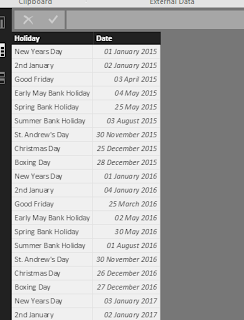
Here i am going to explain how to calculate number of working dates between to given dates. In my approach i am taking a table called Holidays which contains holidays as shown below Once you have this table , we need to use this table in our Datetime table to calculate IsworkingDay column. Now give the relationship between Datetime and Holidays tables as shown below DAX :  IsWorkingDay = IF (NOT(DateTime[Day of Week]= "Saturday" || (DateTime[Day of Week]= "Sunday")) && COUNTX(RELATEDTABLE(Holidays),2)<1,1,0) Now you can create calculated column or measure  Total Working Days Column =  SUMX (     FILTER (         'Datetime',         'Datetime'[Date] >= Tasks[Input Start Date]             && 'Datetime'[Date] <= Tasks[Input End Date]     ),     'Datetime'[IsWorkingDay] ) Total Working Days Measure =...

How to connect Azure SQL database from PowerBI Desktop

Image
1.        Please check Azure portal to get the Server and Database name based on the database connection strings shown below. 2.        Open Power BI Desktop 3.          3.  Select getdata and search for azure and from the list select azure sqldatabase  and click Connect 4.        Provide the Server nameand database name collected from azure portal

Machine Learning for beginners

I am planning to start my career in Datascience and want to learn what are  machine learning models and algorithms. I have googled Before starting to learn and collected some of the points and wanted to share with you what i understand , we should understand  following main steps in analysis using machine learning models: 1. Diagnosing the data – before defining the possible approaches to work with data, it is necessary to analyse the raw data itself first. What kind of measurements are included,  which kind of models it is possible to apply to the data and defining the initial goal of the research. Try and identify all the metrics that are important to the business. The metrics we are optimising for have a profound effect on the solution we choose, so it is important to identify these early on. It also affects what alternatives there are to machine learning. 2. Data Preparation – merging data, imputing missing values or excluding variables with too many m...

PowerBI :Best Method for Versioning Power BI Files and Tracking Incremental Changes to the report

For PowerBI pro License we have the feature called Groups . When we aCreate Group in Power BI ,It  automatically creates  a folder in OneDrive for Business for that Group . The best method for deploying  power BI Report/Dashboard fromPowerBI desktop to PowerBI  service is 1. Once the Report is finished in PowerBI desktop save the file. 2.Place that  .pbix file in Group folder in onedrive for Business 3. From PowerBI service Connect to the new file which is in Onedrive for that group 4.Later if you made any changes to the report , you can place the modified .pbix file in one drive it automatically reflects the change to powerBI when refersh happens

How to Add power BI tiles in CRM Online

1. ADMIN of CRM online can select this feature to insert  Power BI Tiles in CRM dashboards 2. Go to Seeting --> System -- > Administrration --> system Settings 3. Go to Repoting Tab in system settings 4. Allow Power BI tile embeeding option to Yes 5. Go to Sales --> Dashboards  --> New 6. Select the layout whihc you want to insert 7. Now Click on Power BI Tile Tab ( appears after you perform step 4 ) 8. now you are able to see all the dashboards and tiles you have permission in power BI site 

Simple steps to Connect Power BI Reports from CRM online dashboards

Step 1 : Create a new web resource in CRM onine ( web resouces is under components is CRM solution) Step 2 :  In new Web Resource give the fallowing details         General          Name : PowerBI_Interactive          Displayname : Power BI CRM Dashboard          Description : CRM Dashboards using power BI     Content           Type : webpage (HTML)           Language : English              URL: iframe code to ccess powerBI reports , by using iframe code you can access power BI reports from any web page where it is used once web resource is created crosscheck if it is listed down in web resources section step 3 : In Dasbords Tab of CRM online  , create a new dashboard and link the web resources created previously Step 4 : save and publish the dashboard